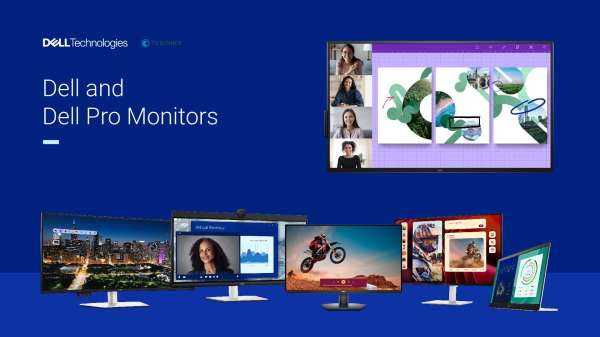
What makes Dell monitors a good fit for modern, AI-ready workplaces?
Organizations choose Dell and Dell Pro monitors because they’re designed as part of a broader, AI-ready workspace rather than as stand‑alone screens.
Key reasons include:
1. **Designed for the AI era and productivity**
- Dell offers an extensive portfolio with **larger displays, higher resolutions and future‑proof connectivity** (USB‑C, Thunderbolt 3/4, RJ45 on select models).
- Monitors are **designed and tested for a seamless experience with Dell systems**, helping reduce compatibility issues and simplifying deployment.
2. **Broad portfolio for different work styles**
- **UltraSharp**: Design-forward, color-accurate monitors with up to **99.8% DCI‑P3** and resolutions up to **8K**, plus IPS Black panels and advanced collaboration features (e.g., built‑in 4K HDR webcam, dual 14W speakers on U3224KB).
- **Pro Plus**: Business-focused monitors with **USB‑C hubs, RJ45**, and sizes from a **14" portable display** up to **75" large format** 4K touch screens.
- **Pro**: Essential, energy‑efficient displays for everyday business needs, including thin‑bezel options and sizes from **17" to 27"** for single or multi‑monitor setups.
- **Plus**: Everyday and home‑office monitors with **up to 4K QD‑OLED**, up to **120 Hz** refresh rates, built‑in speakers, and AI‑enhanced 3D spatial audio.
3. **Reliability and service**
- Dell monitors deliver a **99.6% uptime rate** in the first year, based on Dell Quality Intelligence internal analysis (0.4% dispatch rate).
- This is backed by an **industry‑best 3‑year Advanced Exchange Service** and **Premium Panel Exchange** warranty on many models, giving IT teams predictable support and reduced downtime.
4. **End‑to‑end management**
- With **Dell Display and Peripheral Manager**, IT can **customize and manage the entire Dell PC ecosystem** from a single application.
- This helps standardize configurations, push settings, and streamline support across desks and meeting rooms.
5. **Collaboration and conferencing**
- Many monitors include **built‑in webcams, microphones, speakers, KVM switches, and USB‑C/Thunderbolt hubs**, which simplifies video conferencing room solutions and hot‑desking.
- Features like **Picture‑by‑Picture (PBP), Picture‑in‑Picture (PIP)** and multi‑PC connectivity (e.g., U4323QE with four FHD partitions via iMST) support flexible, multi‑source workflows.
6. **Sustainability focus**
- Dell offers one of the **widest portfolios of EPEAT Climate certified monitors**, and uses **recycled and renewable materials** in products and packaging.
- Many models also meet **ENERGY STAR** and **TCO** designations, helping organizations meet environmental and compliance goals.
7. **Market leadership**
- Dell is recognized as **the world’s #1 monitor company**, based on IDC’s Worldwide Quarterly PC Monitor Tracker (Q4 2024), which signals scale, supply stability, and a mature product roadmap.
Together, these elements help businesses reimagine the desktop as a managed, AI‑ready, sustainable workspace rather than just a collection of peripherals.
How do Dell monitors support eye comfort and employee well-being?
Dell puts a strong emphasis on eye comfort and overall workplace well‑being across its monitor portfolio, which is especially important for teams working on screens all day.
Key eye comfort and well‑being features include:
1. **Industry-leading eye comfort certifications**
- Dell leads the industry with the **highest 5‑star eye comfort certification** on select monitors, helping support more comfortable viewing during extended use.
- Many models carry **TÜV Rheinland eye comfort certifications**, signaling compliance with recognized low blue light and flicker standards.
2. **ComfortView and ComfortView Plus**
- **ComfortView Plus** is a built‑in, always‑on low blue light solution that **reduces blue light emissions to less than 35%** on select Pro Plus models, **without compromising color quality**.
- **Improved ComfortView Plus** appears across UltraSharp, Pro Plus, and Plus lines, further refining blue light reduction while maintaining accurate color for content creators and knowledge workers.
3. **Advanced panel technologies for better viewing**
- **IPS Black panels** (common in UltraSharp and curved models) deliver deeper contrast (often **2000:1 or 3000:1**) and more consistent colors across wide viewing angles, which can reduce eye strain from washed‑out or uneven images.
- High color coverage (e.g., **up to 99.8% DCI‑P3**, 100% sRGB, 100% Rec.709 on many UltraSharp models) ensures clear, lifelike visuals that are easier to interpret and work with.
4. **Adaptive brightness and reflectance control**
- Features like **Ambient Light Management** and **lower reflectance panels** (e.g., U2725QE, U3225QE, U2724DE) help the display adapt to room lighting and reduce glare, which can lessen visual fatigue over long sessions.
5. **Ergonomic adjustability**
- Most Dell business monitors support **height adjustment, tilt, swivel, pivot and sometimes slant adjust**, allowing employees to set up their screens at eye level and in comfortable positions.
- This supports better posture and helps reduce neck and back strain in addition to eye fatigue.
6. **Well-being in everyday and home setups**
- Dell Plus monitors, designed for everyday work and entertainment, combine **up to 4‑star TÜV Rheinland eye comfort certification** with features like **quick‑access ports** and simple single‑cable USB‑C setups.
- This makes it easier for hybrid workers to maintain a comfortable, clutter‑free workspace at home.
By combining certified low blue light technologies, ergonomic design, adaptive brightness, and high‑quality panels, Dell monitors help organizations rethink how they support employee comfort and long‑term well‑being in screen‑intensive roles.
How do Dell monitors help IT teams manage devices, support sustainability, and reduce total cost of ownership?
Dell and Dell Pro monitors are built with IT operations and sustainability in mind, helping organizations manage fleets more easily while supporting environmental and cost objectives.
1. **Centralized, simplified management**
- **Dell Display and Peripheral Manager** provides an **end‑to‑end solution** to customize and manage the entire Dell PC ecosystem from a single application.
- IT can standardize monitor settings, push configurations, and streamline troubleshooting across desks and meeting rooms, which reduces hands‑on support time.
2. **High reliability and strong warranty coverage**
- Dell monitors deliver a **99.6% uptime rate** in the first year, based on Dell Quality Intelligence internal analysis (0.4% dispatch rate).
- This reliability is backed by an **industry‑best 3‑year Advanced Exchange Service** and **Premium Panel Exchange** on many models, helping minimize downtime and replacement costs.
3. **Connectivity that reduces clutter and hardware sprawl**
- Many Pro Plus, UltraSharp, and Plus models include **USB‑C hubs** with up to **90W power delivery**, **Thunderbolt 3/4**, and **RJ45** for wired Ethernet.
- This allows a **single‑cable setup** for power, data, and video, reducing the need for separate docks and extra cabling, which can lower hardware and deployment costs.
4. **Flexible form factors for different environments**
- The portfolio ranges from **14" portable monitors** for mobile workers to **75" 4K touch large format displays** for meeting rooms.
- Built‑in features like **KVM switches, PBP/PIP, internal MST, multi‑PC connectivity**, and integrated speakers/webcams reduce the need for additional peripherals in conference rooms and trading‑style desks.
5. **Sustainability and compliance support**
- Dell offers one of the **widest portfolios of EPEAT Climate certified monitors**, with many models also meeting **ENERGY STAR** and **TCO** designations.
- Monitors and packaging use **recycled and renewable materials** (including recycled aluminum, steel, plastics, and glass in Dell Plus monitors, and 100% recycled and/or renewable packaging materials on select models).
- Dell Pro monitors are built using **renewable energy** and meet top safety and environmental standards, helping organizations align with internal ESG targets and external reporting requirements.
6. **Long-term value and vendor consolidation**
- As **the world’s #1 monitor company** (IDC, Q4 2024), Dell can support global rollouts with consistent product lines and predictable availability.
- Standardizing on Dell monitors across UltraSharp, Pro Plus, Pro, and Plus families helps consolidate vendors, simplify procurement, and streamline support contracts.
For IT and procurement teams, these capabilities help reimagine monitors as managed, sustainable assets that contribute directly to lower total cost of ownership and more efficient operations, rather than as isolated hardware purchases.




 Sign in with LinkedIn